 XScanner
How to use XScanner
Short videos and simple steps for every feature. हर फ़ीचर के लिए छोटे वीडियो और आसान स्टेप्स।
▶ Video guides वीडियो गाइड
12 short videos with sound and captions in English and हिन्दी. Tap one to watch it with its steps.
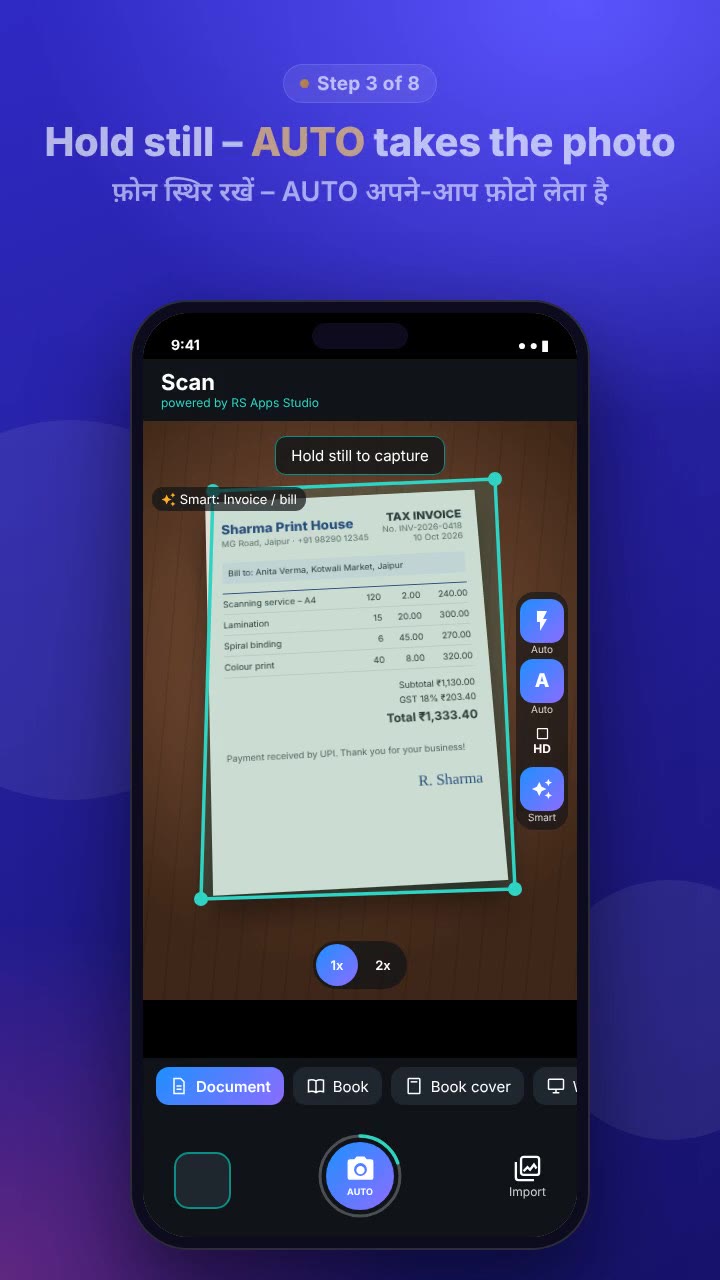 0:33Scan a documentदस्तावेज़ स्कैन करें
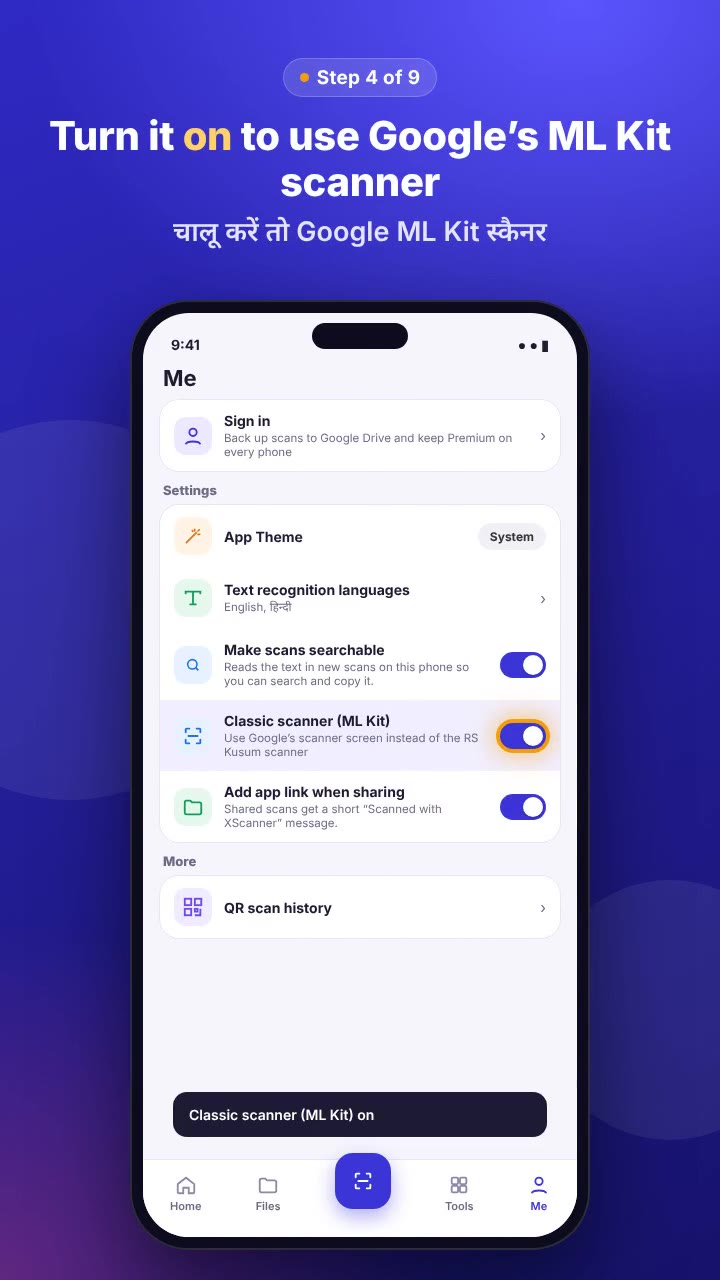 0:37Choose your scanner: XScanner or Google ML Kitस्कैनर चुनें: XScanner या Google ML Kit
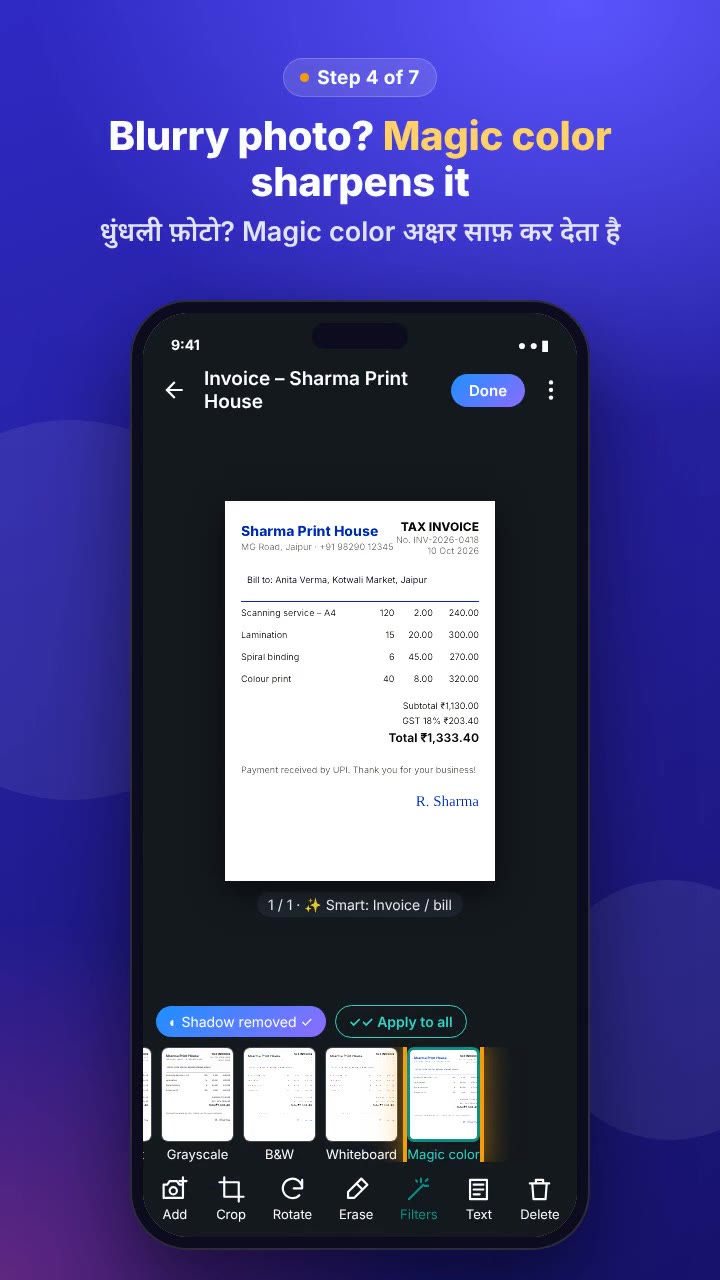 0:28Filters, shadow removal and Magic colorफ़िल्टर, परछाईं हटाना और Magic color
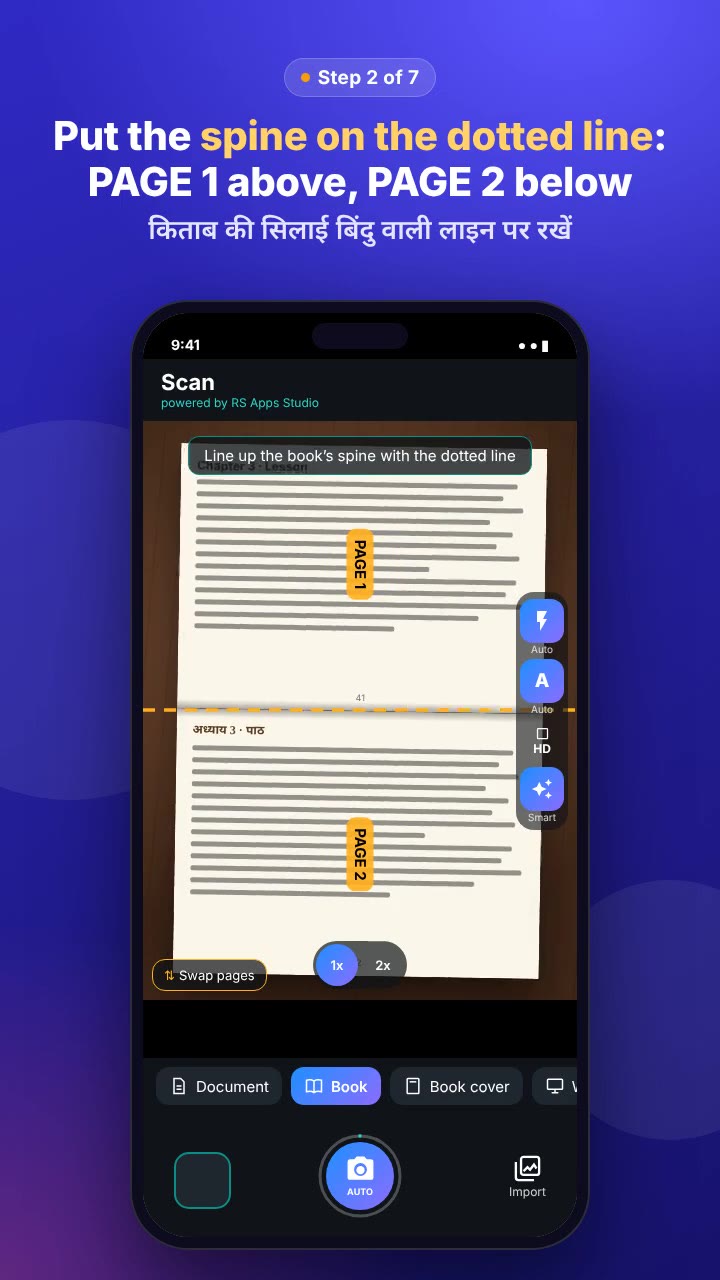 0:30Scan a book (two pages in one photo)किताब स्कैन करें (एक फ़ोटो में दो पेज)
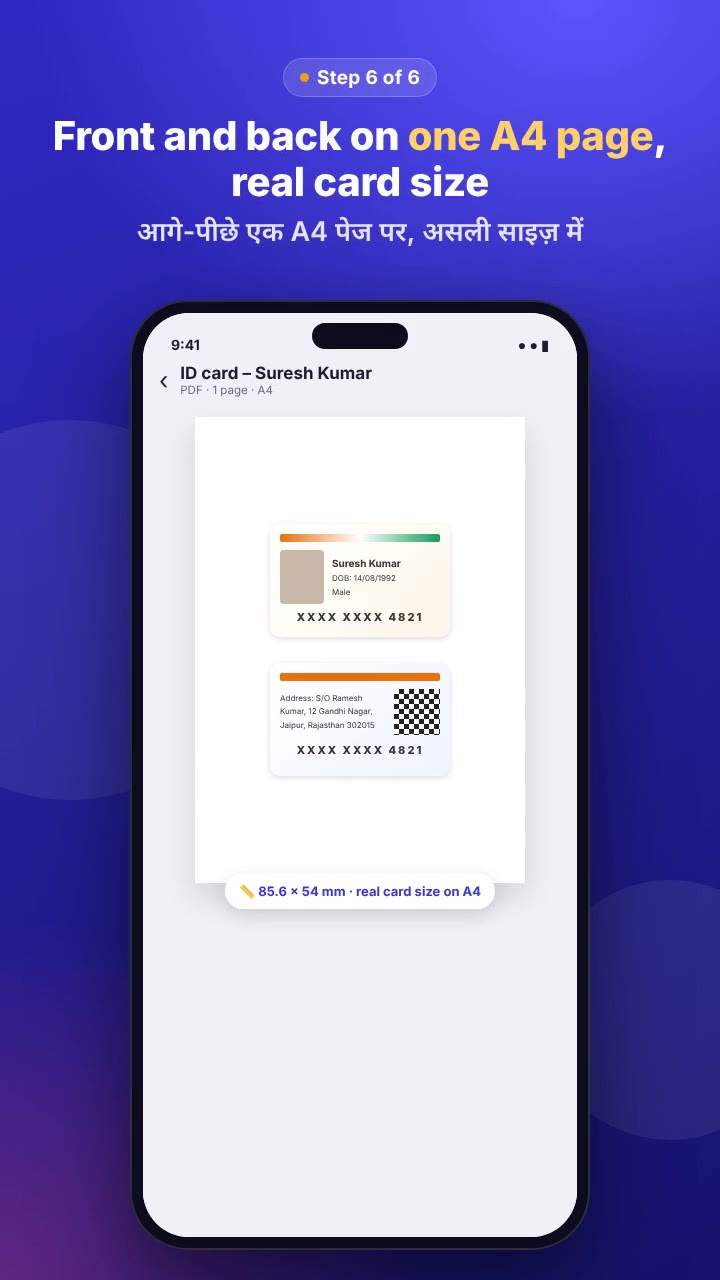 0:26ID card: front and back on one pageID कार्ड: आगे और पीछे एक ही पेज पर
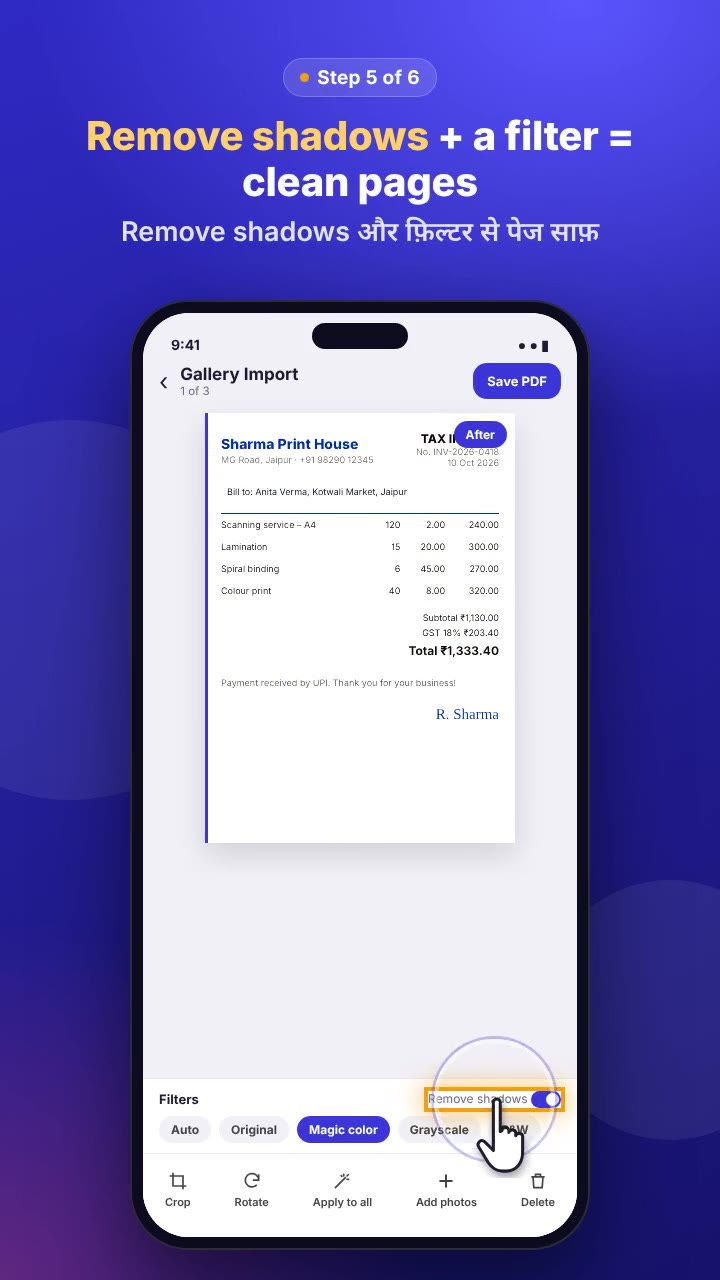 0:25Turn photos into a PDFफ़ोटो से PDF बनाएँ
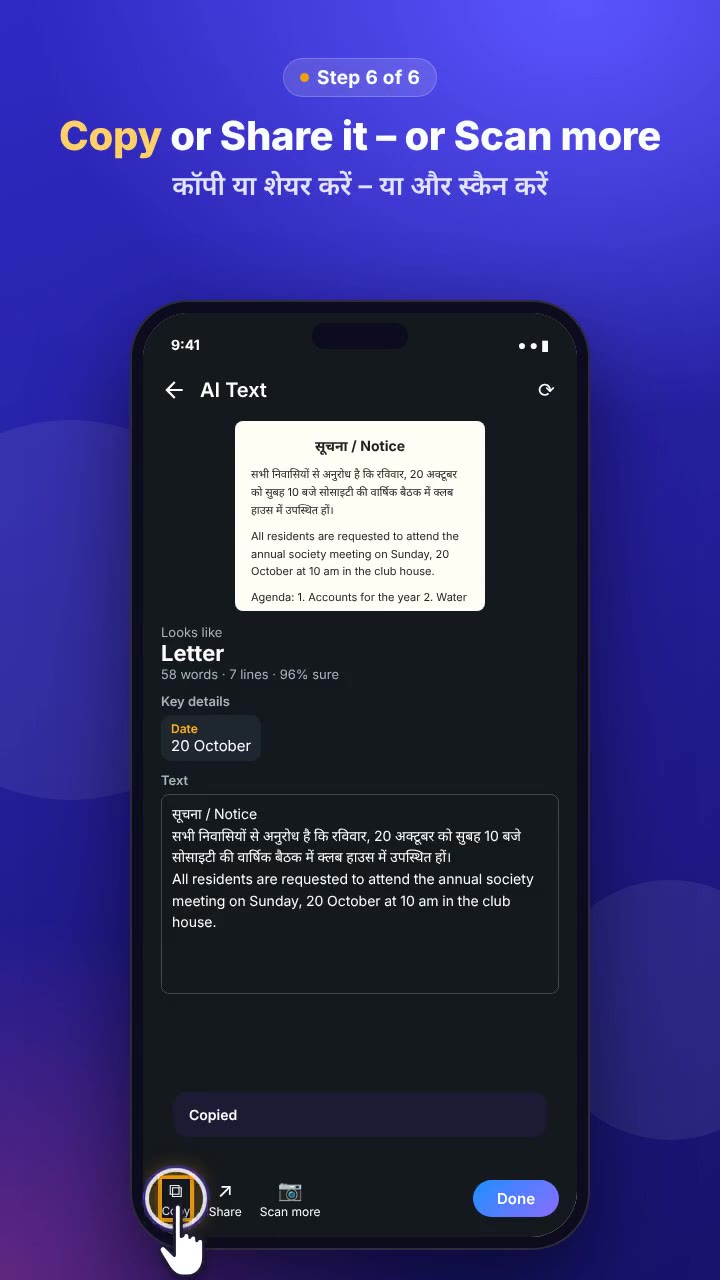 0:25Copy text from a page (OCR)पेज से टेक्स्ट कॉपी करें (OCR)
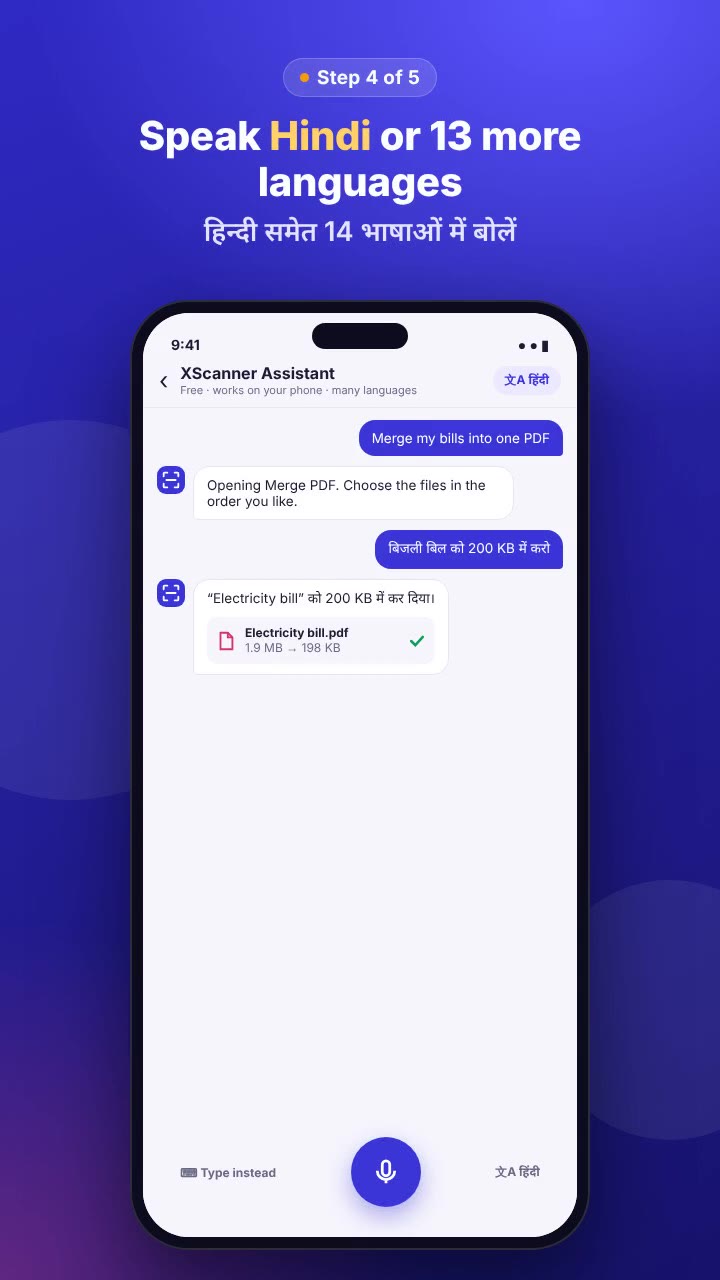 0:23XScanner AI Assistant (voice)XScanner AI असिस्टेंट (आवाज़ से)
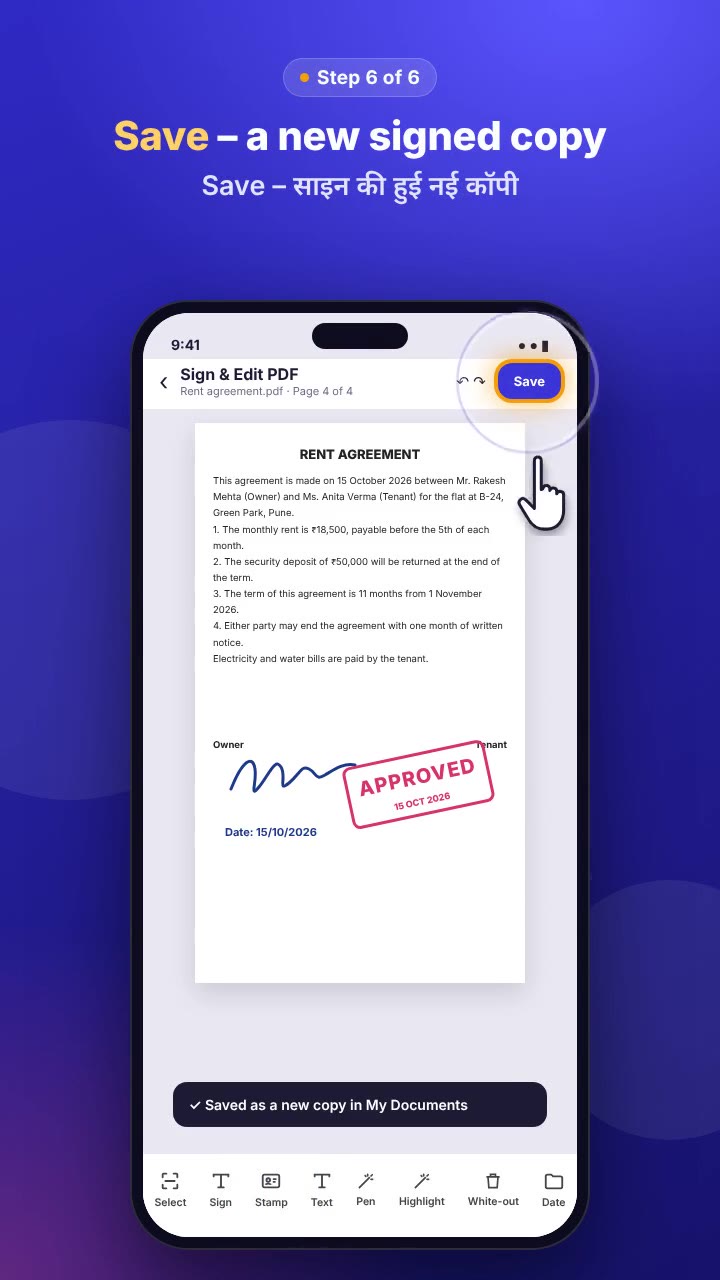 0:25Sign and edit a PDFPDF पर साइन करें और एडिट करें
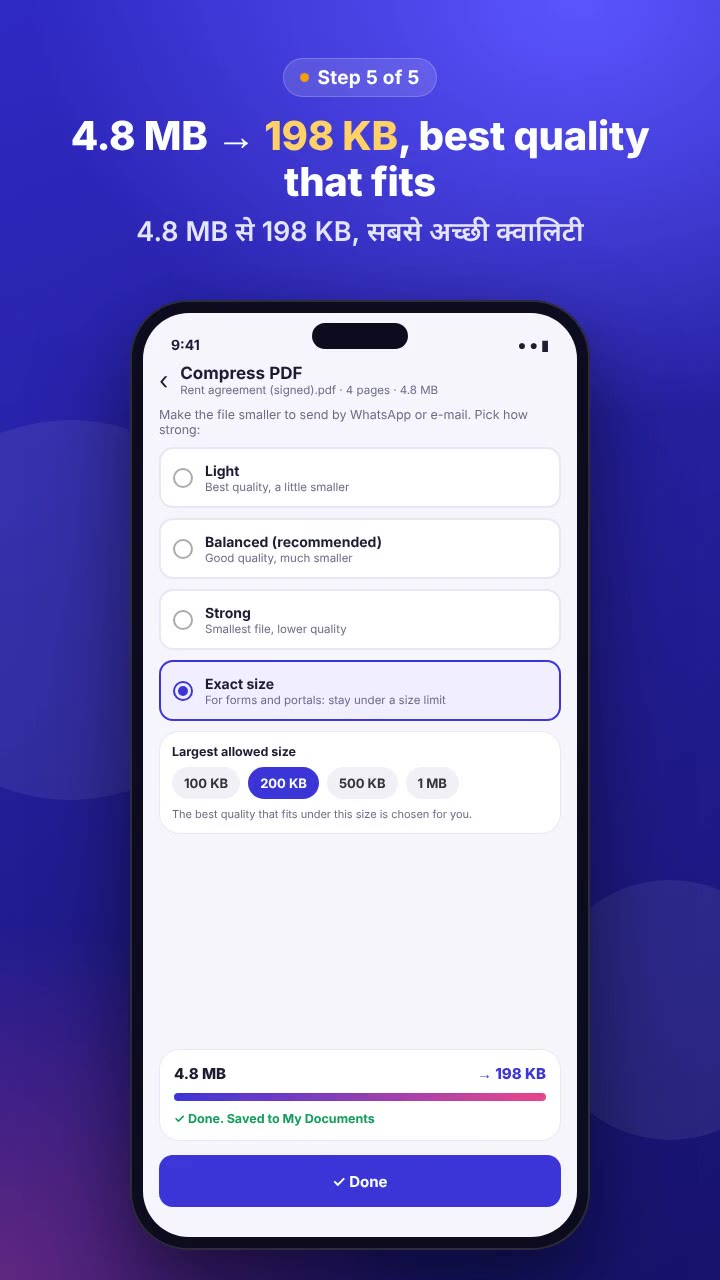 0:22Compress a PDF (also to an exact size)PDF छोटी करें (तय साइज़ तक भी)
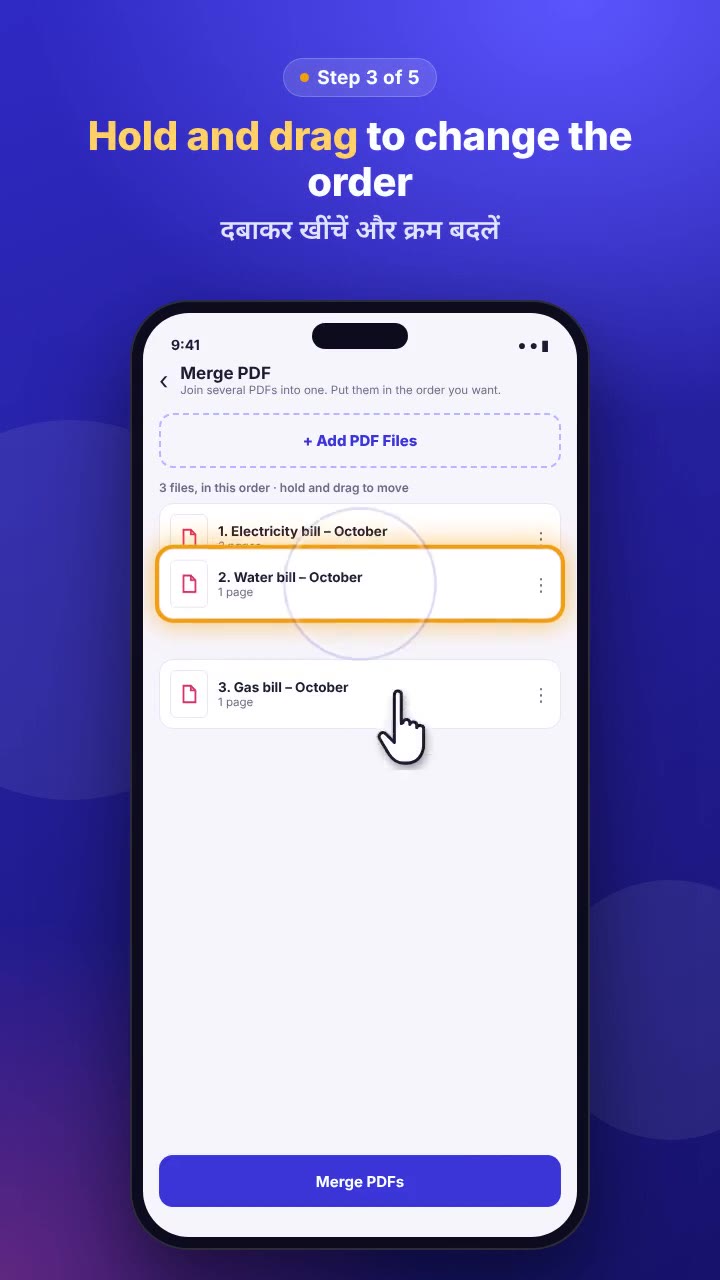 0:21Merge PDFs into oneकई PDF जोड़कर एक बनाएँ
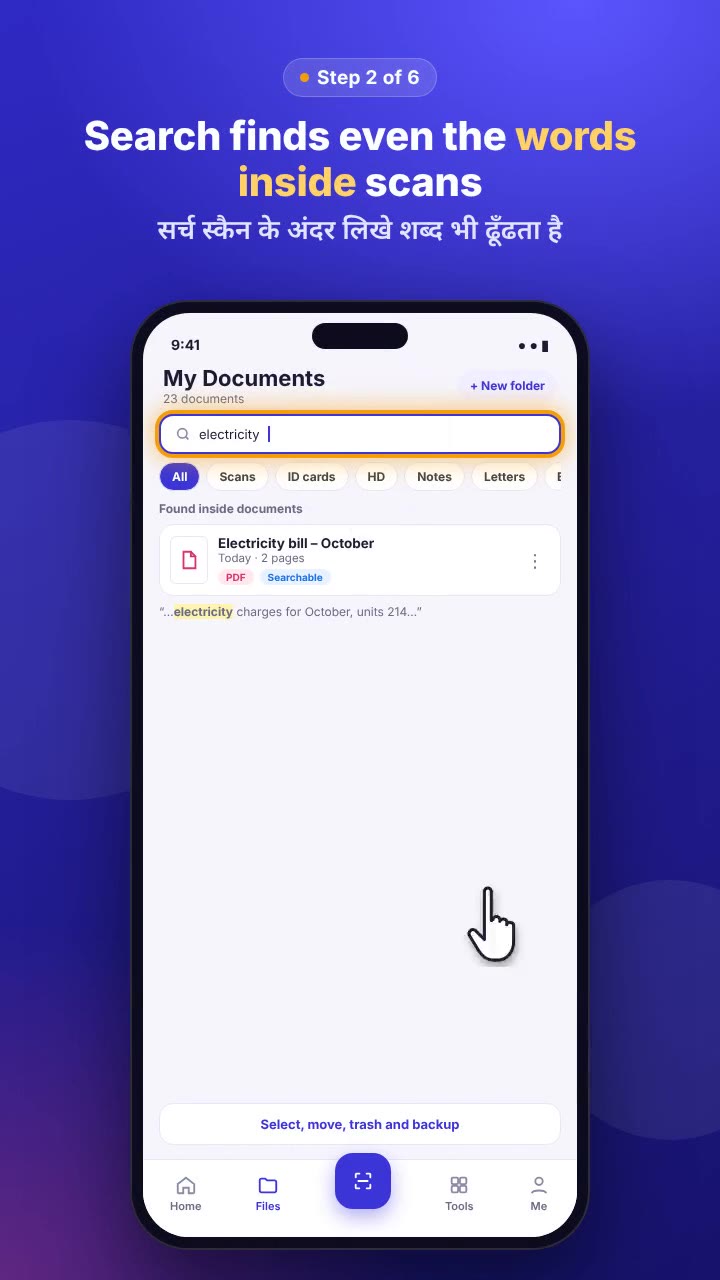 0:26Find, rename and organise your documentsदस्तावेज़ ढूँढें, नाम बदलें और व्यवस्थित करें
📷 Scanning स्कैन करना
Scan a document
दस्तावेज़ स्कैन करें
Turn any paper into a clean PDF: XScanner finds the page, takes the photo when you hold still, straightens it and cleans it.
▶ VideoHow to →Choose your scanner: XScanner or Google ML Kit
स्कैनर चुनें: XScanner या Google ML Kit
XScanner has two scanner engines. Its own XScanner scanner (the RS Kusum Scanner) is used by default. Switch on Classic scanner (ML Kit) and the document scanner – Start scanning and the Scan button – uses Google’s scanner screen instead. The special scans – Book, Book cover, Whiteboard, Business card and ID card – and HD Scan, Extract Text and AI handwriting always use the XScanner scanner.
▶ VideoHow to →Filters, shadow removal and Magic color
फ़िल्टर, परछाईं हटाना और Magic color
Phone photos of paper often look grey, dark or shadowed. Filters make the paper white and the text sharp in one tap.
▶ VideoHow to →Crop, rotate, add or delete pages
पेज क्रॉप, घुमाएँ, जोड़ें या हटाएँ
Before you save, every page can be fixed: change the crop, turn it, add more pages or remove a bad one.
How to →Scan a book (two pages in one photo)
किताब स्कैन करें (एक फ़ोटो में दो पेज)
Book mode takes both open pages in one photo, cuts them apart at the spine, flattens curved pages and saves them in reading order.
▶ VideoHow to →ID card: front and back on one page
ID कार्ड: आगे और पीछे एक ही पेज पर
Aadhaar, PAN, voter ID, driving licence or any card: XScanner scans the front, then the back, and puts both on one A4 page at the real card size (85.6 × 54 mm).
▶ VideoHow to →HD (4K) scan for small print
छोटे अक्षरों के लिए HD (4K) स्कैन
HD scan keeps the camera’s full resolution, so tiny print, signatures and fine drawings stay sharp.
How to →Turn photos into a PDF
फ़ोटो से PDF बनाएँ
Already took photos of a document? Pick them from your gallery: XScanner crops and straightens each one, cleans it with the scanner filters and makes one PDF.
▶ VideoHow to →Book cover, whiteboard and business card modes
बुक कवर, व्हाइटबोर्ड और बिज़नेस कार्ड मोड
The camera has a mode for each kind of paper. Swipe the mode bar above the shutter to switch.
How to →QR code scanner and history
QR कोड स्कैनर और हिस्ट्री
Scan QR codes for links, Wi-Fi, contacts and text. Every code you scan is kept in your history.
How to →🔤 Text & AI टेक्स्ट और AI
Copy text from a page (OCR)
पेज से टेक्स्ट कॉपी करें (OCR)
Point the camera at printed text and XScanner reads it, offline, in Hindi, English and many more languages. Copy it, share it or save it.
▶ VideoHow to →AI handwriting to text
AI से हाथ की लिखावट को टेक्स्ट बनाएँ
Turn handwritten notes, registers and letters into text you can edit and copy.
How to →Make a PDF searchable
PDF को सर्च करने लायक बनाएँ
Reads the text on scanned pages and adds it to the PDF invisibly. The pages look the same, but you can search, select and copy the text in any PDF app.
How to →Get the text and pictures out of a PDF
PDF से टेक्स्ट और फ़ोटो निकालें
Read the text of a PDF (also scanned pages) or save the pictures in it.
How to →XScanner AI Assistant (voice)
XScanner AI असिस्टेंट (आवाज़ से)
Just say what you need, for example “merge my bills into one PDF” or “compress my last scan to 200 KB”, and the assistant opens the right tool. It is free, works on your phone and speaks 14 languages.
▶ VideoHow to →🛠️ PDF tools PDF टूल्स
Sign and edit a PDF
PDF पर साइन करें और एडिट करें
Fill in and sign forms and agreements: add text, your signature or stamp, ticks, dates, highlight, white-out or hide private details.
▶ VideoHow to →Your signature and official stamp
आपका साइन और ऑफ़िशियल मोहर
Save your signature and your office stamp once, with a clean transparent background, and place them on any PDF or note.
How to →Compress a PDF (also to an exact size)
PDF छोटी करें (तय साइज़ तक भी)
Make files smaller for WhatsApp, e-mail and upload portals. Exact size mode stays under a limit such as 200 KB for online forms.
▶ VideoHow to →Merge PDFs into one
कई PDF जोड़कर एक बनाएँ
Join several PDFs into one, in the order you want: all your bills in one file, or new pages added to an older PDF.
▶ VideoHow to →Split a PDF
PDF के हिस्से करें
Make several smaller PDFs out of one.
How to →Reorder, turn or delete pages
पेज का क्रम बदलें, घुमाएँ या हटाएँ
Rearrange the pages of a PDF, turn the ones that are sideways, delete what you don’t need, or print several pages on one sheet.
How to →Add page numbers
पेज नंबर जोड़ें
Number every page of a PDF, for files, theses and court papers.
How to →PDF to JPG
PDF से JPG फ़ोटो
Turn every page into a picture to share on WhatsApp or save to your gallery.
How to →Enhance a scanned PDF
स्कैन की गई PDF को साफ़ करें
Make scanned PDFs cleaner and easier to read, also ones from other apps.
How to →Add a watermark
वॉटरमार्क लगाएँ
Stamp text such as CONFIDENTIAL or your name across the pages.
How to →Lock or unlock a PDF with a password
PDF पर पासवर्ड लगाएँ या हटाएँ
Lock a PDF with a password, or remove the password from one you can open.
How to →✍️ Create बनाएँ
Application letters (English and Hindi)
आवेदन पत्र (अंग्रेज़ी और हिन्दी)
30+ ready letters: leave, job, bank, school and college, complaints and certificates, in English and हिन्दी.
How to →Notes and PDF creator
नोट्स और PDF बनाना
Write notes with headings, lists and colours, dictate by voice, add pictures, your signature or stamp, and turn them into professional PDFs.
How to →Resume creator
रिज़्यूमे बनाएँ
15 resume designs (ATS-friendly, fresher, teacher, nurse, engineer and more) that you fill in on your phone and save as print-ready PDFs.
How to →Project Studio (maths and science, class 9–12)
प्रोजेक्ट स्टूडियो (गणित और विज्ञान, कक्षा 9–12)
Make maths and science projects on blank, ruled, squared or graph pages with pen, equations, tables, shapes and symbols, and read chapter explanations and step-by-step solutions. Works offline.
How to →📁 Files & sharing फ़ाइलें और शेयर
Find, rename and organise your documents
दस्तावेज़ ढूँढें, नाम बदलें और व्यवस्थित करें
All your scans and PDFs are in the Files tab. Search even finds the words inside your scans.
▶ VideoHow to →Share, print and open PDFs
शेयर, प्रिंट और PDF खोलना
Send documents as PDF, pictures or text, print them, or read them in the built-in viewer with search and night reading.
How to →Back up to Google Drive and move to a new phone
Google Drive पर बैकअप और नया फ़ोन
Your documents live on your phone. Back them up to your own Google Drive before you change phones or uninstall.
How to →⚙️ Account, settings & help अकाउंट और सेटिंग्स
Settings: scanner, languages and theme
सेटिंग्स: स्कैनर, भाषाएँ और थीम
Make XScanner work your way.
How to →Premium: what you get, restore and cancel
प्रीमियम: फ़ायदे, रीस्टोर और कैंसल
Scanning and the PDF tools are free. Premium removes ads, makes HD scans unlimited and gives 50 AI handwriting pages a month.
How to →Something not working?
कुछ काम नहीं कर रहा?
Quick fixes for the most common problems. Still stuck? Write to us from Me › About and support (email or WhatsApp).
How to →Nothing found. Try another word, or see all questions.
Get XScanner free
Free on Google Play. Android.